About ShopSage
What is ShopSage?
ShopSage revolutionizes online shopping by providing an AI voice-based conversational shopping experience. Instead of navigating through complex UI controls, filters, and menus, you simply talk to the AI assistant, and it operates the interface for you. This creates a more natural, human-like shopping experience—because humans have always preferred voice-based conversations over clicking buttons.
Try the Demo
Experience ShopSage yourself and see how AI transforms online shopping!
Demo Video: Watch the demo video.
AI Integration Made Simple
One of the key insights from this project is that AI can be integrated with any existing application remarkably easily—if the application is already architected properly.
The secret? Keep your UI "dumb" and expose proper business logic functions.
In ShopSage, the UI components are intentionally kept simple and stateless. All the business logic—cart management, product search, navigation, checkout flow—is centralized in Zustand stores that expose clean, well-defined functions.
Here's the beautiful part: The way UI components trigger these functions is exactly the same way AI can trigger them.
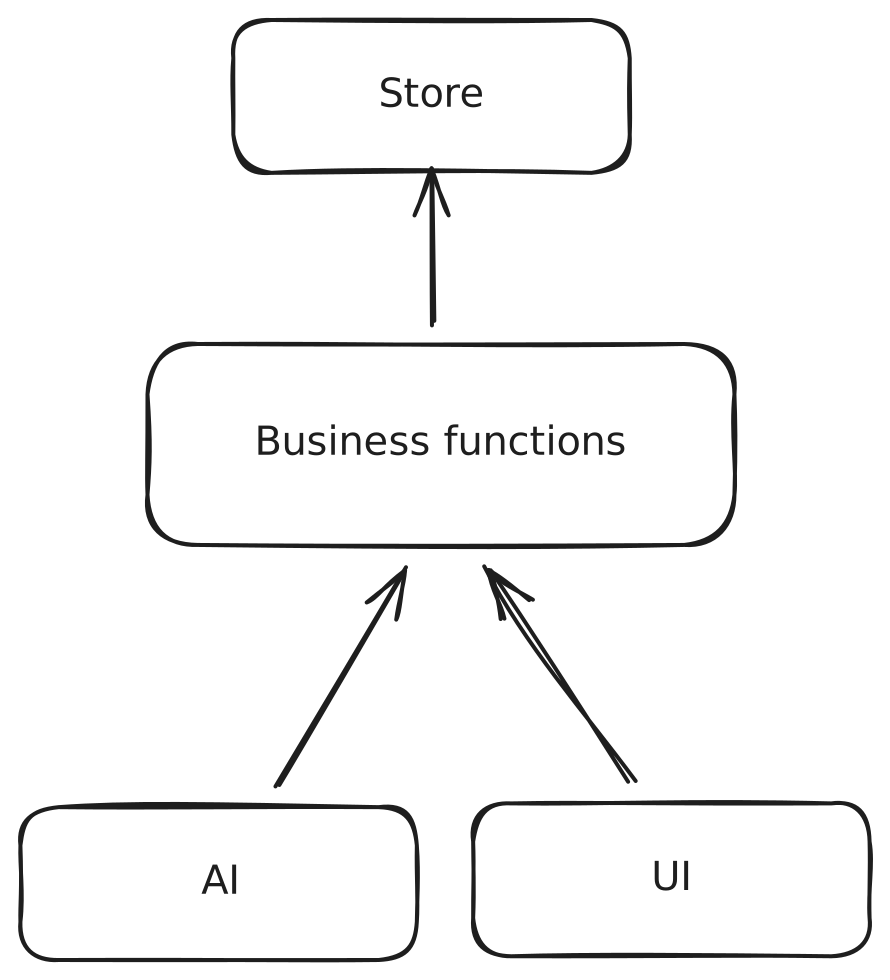
When a user clicks "Add to Cart," the UI calls addToCart(productId). When the AI assistant hears "add this to my cart," it calls the exact same addToCart(productId) function. There's no special AI-specific code path—the AI is just another client of your business logic layer.
This architectural pattern means:
- ✅ No duplicate logic - UI and AI share the same functions
- ✅ Easy testing - Test your business logic once, it works for both UI and AI
- ✅ Maintainable - Changes to business logic automatically work for both interfaces
- ✅ Scalable - Add new AI capabilities by simply exposing existing functions
The lesson: If you're building modern applications with proper separation of concerns—where UI is just a presentation layer and business logic is cleanly abstracted—adding AI capabilities becomes trivial. You're not bolting AI onto your app; you're giving AI access to the same well-designed API that your UI already uses.
Why Voice-Based Shopping?
Traditional e-commerce requires you to:
- Navigate through multiple pages and menus
- Apply filters manually
- Search using exact keywords
- Click through countless product listings
ShopSage flips the script. You talk naturally, and the AI:
- Understands your context and preferences
- Operates the UI on your behalf
- Finds products using semantic understanding
- Manages your cart and checkout process
Possibilities & Benefits
1. AI-Powered Suggestions Based on Your Needs
Instead of browsing aimlessly, describe what you need in natural language:
- "I need an outfit for a summer wedding in Italy under ₹15,000"
- "Find me running shoes good for flat feet"
- "Show me formal shirts in blue or white from premium brands"
The AI understands context, preferences, and complex queries to find exactly what you're looking for.
2. Deeper Insights Beyond the Screen
The AI can provide information that may not be immediately visible on the screen:
- Compare products across different attributes
- Explain why a product might be suitable for your needs
- Provide pricing insights and discount information
- Suggest complementary products based on your cart
3. Actions Without UI Controls
The screen has limited space for data and CTAs (Call-to-Actions). The AI can perform actions that don't have visible buttons:
- Navigate between pages seamlessly
- Scroll to specific products
- Filter by multiple criteria simultaneously
- Manage cart items with voice commands
- Handle checkout with address selection
4. Natural Conversation Flow
Interrupt, ask follow-ups, change your mind—just like talking to a real salesperson. The AI maintains context throughout the conversation.
5. Hands-Free Shopping
Perfect for multitasking or accessibility needs. Shop while cooking, driving, or when you can't use your hands.
6. Personalized Shopping Assistant
The AI acts like a knowledgeable salesperson who:
- Remembers your preferences during the session
- Provides witty, engaging responses
- Keeps you informed about your wallet balance
- Guides you through the entire shopping journey
Limitations & Considerations
1. Requires Internet Connection
The AI relies on real-time API calls to OpenAI's servers, requiring a stable internet connection for optimal performance.
2. Learning Curve for Voice Commands
Some users may initially prefer traditional UI controls and need time to adapt to voice-based interactions. However, the natural conversation style makes this transition smoother.
Technical Architecture
AI Capabilities
ShopSage's AI assistant is powered by OpenAI's Realtime API with 15 specialized tools that enable comprehensive shopping operations:
Product Discovery Tools
- search_products - Semantic search with natural language queries and filters (brand, category, gender, color)
Shopping Cart Tools
- get_cart_info - View cart items, total, and wallet balance
- add_to_cart - Add products to cart (max 5 items)
- remove_from_cart - Remove items from cart
Checkout & Delivery Tools
- get_addresses - Retrieve available delivery addresses
- open_address_modal - Open address selection interface
- close_address_modal - Close address selection interface
- initiate_checkout - Start checkout process with address selection
- place_order - Complete order with selected delivery address
Navigation Tools
- navigate_to_page - Navigate between pages (home, search, cart, orders)
- view_product - Open product detail page
- go_back - Navigate to previous page
- go_forward - Navigate to next page
Scroll Control Tools
- scroll - Scroll up/down by small/medium/large amounts
- scroll_to_extreme - Jump to top or bottom of page
The AI agent is configured with a witty, energetic Indian salesman personality, using colloquial phrases like "Bhai," "Arre," "Ek dum solid," making the experience feel like shopping at your favorite local store.
Vector Search Technology
ShopSage implements AI-powered semantic search using MongoDB's Vector Search capabilities:
- Embedding Model: OpenAI's
text-embedding-ada-002generates 1536-dimensional vector embeddings - Search Algorithm: MongoDB Vector Search with
dotProductsimilarity - Hybrid Search: Combines vector similarity with traditional filters (brand, category, color, gender)
- Smart Filtering: Two-stage pipeline - vector search followed by attribute filtering
This enables searches like "comfortable summer wear" to find relevant products even if they don't contain those exact keywords.
Dataset: Ajio Fashion Products
ShopSage uses the publicly available Ajio dataset (reliance-fashion-trend.csv):
- Original Size: 30,000+ fashion products
- Processed Size: ~5,000 high-quality products with complete data
- Product Categories: Clothing, footwear, accessories across Men, Women, and Unisex categories
- Brands: 100+ brands including Nike, Adidas, Puma, Levis, and many Indian brands
- Attributes: Product ID, brand, description, category, gender category, color, original price, discount price, images, URLs
Data Pipeline: Excel to MongoDB
The excel-to-mongodb folder contains the complete data processing pipeline:
Step 1: Data Reduction
- Script:
src/utils/reduce-data-script.js - Reduces 30,000+ rows to ~10,000 by keeping every 6th row
- Creates manageable dataset for processing
Step 2: Data Processing & Embedding Generation
- Command:
npm run process - Reads and validates CSV data
- Generates AI embeddings using OpenAI's API
- Splits data into batches for efficient processing
- Removes incomplete records
- Output: Batch files in
data/batches/
Step 3: Batch Merging
- Script:
data/batches/merge_batches.js - Merges all batch files into
all_products.json - Final count: ~5,000 products with embeddings
Step 4: MongoDB Upload
- Command:
npm run upload - Uploads all product data with vector embeddings to MongoDB
- Uses MongoDB service for bulk insertion
Step 5: Vector Index Creation
- Command:
npm run createVectorIndex - Creates vector search index on
productVectorfield - Configures 1536-dimensional vector space
- Enables efficient similarity searches
Step 6: Search Testing
- Command:
npm run search "query" - Tests semantic search functionality
- Saves results to
data/search/directory
Complete Tech Stack
Frontend (Web)
- Framework: Next.js 15 (React 19) with static export
- Styling: Tailwind CSS v4 with Typography plugin
- State Management: Zustand for global state
- AI Integration:
@openai/agentsSDK for Realtime API - Animations: Motion (Framer Motion successor)
- HTTP Client: Axios
- Schema Validation: Zod
- Content: MDX for documentation pages
- UI Components: Custom components with Lucide React icons
- Utilities: clsx, tailwind-merge for className management
Backend (API - Firebase Functions)
- Runtime: Node.js 22
- Platform: Firebase Cloud Functions v2
- Database: MongoDB with Vector Search
- AI Services: OpenAI API (Realtime + Embeddings)
- Language: TypeScript
- CORS: Enabled for cross-origin requests
- Environment: Firebase Emulator for local development
Data Processing (Excel-to-MongoDB)
- Runtime: Node.js
- Database: MongoDB with vector search capabilities
- AI: OpenAI text-embedding-ada-002
- Data Format: CSV parsing and JSON output
- Batch Processing: Efficient API call optimization
Development & Deployment
- Version Control: Git
- Package Manager: npm
- Linting: ESLint with Next.js config
- Type Checking: TypeScript across all projects
- Hosting: Firebase Hosting (static export)
- API Deployment: Firebase Cloud Functions
Project Structure
ShopSage/
├── web/                    # Next.js frontend application
│   ├── src/
│   │   ├── app/           # Next.js app router pages
│   │   ├── components/    # React components
│   │   ├── lib/           # Agent configuration & utilities
│   │   ├── stores/        # Zustand state stores
│   │   └── data/          # Static data (brands, categories)
│   └── package.json
│
├── api/                    # Firebase Cloud Functions
│   └── functions/
│       ├── src/
│       │   ├── services/  # Business logic services
│       │   └── index.ts   # API endpoints
│       └── package.json
│
└── excel-to-mongodb/       # Data processing pipeline
    ├── src/               # Processing scripts
    ├── data/              # CSV files and batches
    └── package.json
Future Enhancements
- Multi-modal AI with image understanding
- Product recommendations based on purchase history
- Voice-based product reviews and ratings
- Multi-language support
- AR try-on integration
- Social shopping features
Get in Touch
Have questions or need assistance? Reach out to us:
- Email: hineetigya@gmail.com
- GitHub: GitHub Repository Link
- Social Media: LinkedIn | X
We're here to help you get the most out of our tool.
Built with ❤️ using cutting-edge AI technology to make shopping more human.